HCM Analytics
Remote Work & Work location
Overview
The Remote Work & Work Location cards provide insight into employee work arrangements and where work is performed:
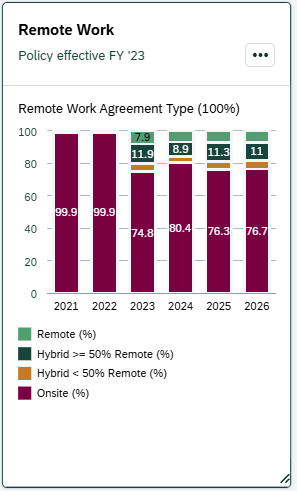
- Remote Work Card – Shows the distribution of employees by remote work agreement type across fiscal years.
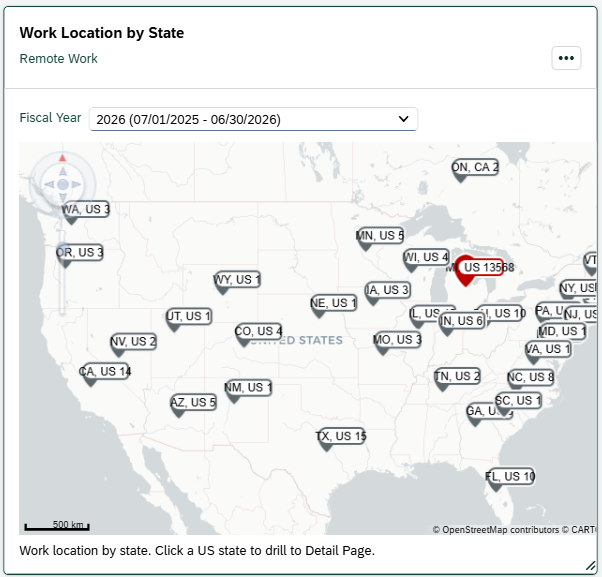
- Work Location by State Map – Shows the geographic distribution of employee work locations for the last fiscal year in the selected date range. To change the fiscal year, click on the Fiscal Year dropdown above the map.
Both cards are based on remote work agreements and work location for benefit-eligible employees as of July 1 of the selected fiscal year.
The university’s Remote Work Policy was established in FY23. Data prior to FY23 was not systematized and may not reflect actual work arrangements.
For additional information on eligibility and when a remote work agreement is required, refer to the Remote Work Help Pages .
Key Metrics & Definitions
> Remote Work Card
The Remote Work Card displays the percentage distribution of employees based on their remote work agreement status as of July 1:
-
- Remote: Employee has a remote work agreement indicating fully remote work.
- Hybrid ≥ 50% Remote: Employee has a remote work agreement indicating at least 50% remote work.
- Hybrid < 50% Remote: Employee has a remote work agreement indicating less than 50% remote work.
- Onsite: Employee does not have a remote work agreement on file and is considered onsite.
How classification works:
-
- If an employee has a remote work agreement on file on 7/1, they are classified as Remote or Hybrid based on that agreement
- If an employee does not have a remote work agreement on file on 7/1, they are classified as Onsite
> Work Location by State
The map displays the number of employees by work location state as of July 1 of the selected fiscal year.
How location is determined:
-
- For employees with a remote work agreement, the location reflects the remote work location (city/state)
- For employees without a remote work agreement, the location reflects the administrative address of the position (city/state)
Security & Access
The Remote Work & Work Location cards are available to users with the following roles:
- Report Administrator
- Report Administrator Sensitive
Org-based security applies; users will only see data for organizations they are permissioned to access.
Drilldown Page
> Remote Work Card
Select any data point within the chart to open the drilldown page for that fiscal year. To view a different fiscal year, adjust the Fiscal Year filter at the top of the page.
> Work Location by State Map
Click on a state in the map to open the drilldown page showing employees with a work location in that state. To view a different fiscal year or state, adjust the filters at the top of the page.
> Filters
The following filters can be applied on the drilldown page. Click 'Go' to apply your selections.
|
Visible by Default |
Available through 'Adapt Filters' |
*Required filter |
|
> Default Views
-
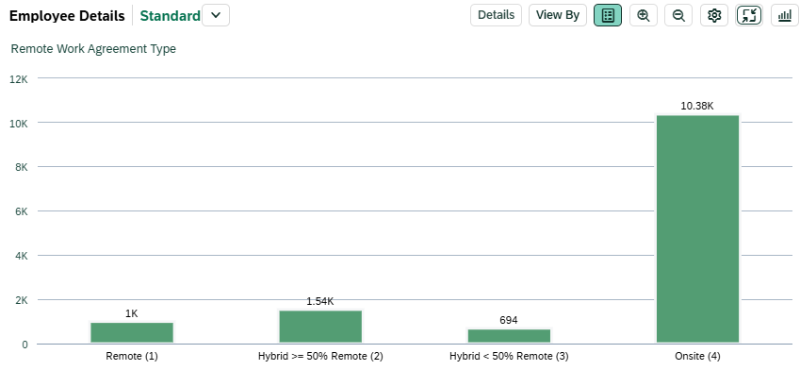
- Chart View: Displays employees by Remote Work Agreement Type in a column chart.
-
-
Table View: Displays the following fields by default:
- Employee Name
- Personnel Subarea
- Employee Group
- Employee Subgroup
- Organizational Unit
- Job
- Remote Work Agreement Type
- City
- State
- Country
- Work Contract
-
Table View: Displays the following fields by default:
> Customizing Your View
You can personalize the chart and table to better align with your analysis needs. Click the gear icon to add, remove, or reorder dimensions. For a brief walkthrough, see the Customizing & Saving Views video .

Available dimensions include:
|
|
|
Interpreting the Data
Remote work classification is based on whether a remote work agreement is on file in the HR/Payroll system as of July 1.
Employees without a remote work agreement are classified as Onsite, even if their actual work arrangement may differ.
Remote work data depends on agreements being submitted and maintained in the system. If agreements are not entered or kept up to date, remote or hybrid arrangements may be underrepresented.
Work location reflects:
- The remote work location for employees with agreements
- The administrative work location for employees without agreements
Data prior to FY23 may not accurately reflect remote work arrangements due to the absence of a standardized policy and system tracking.
On the Work Location by State map, the default view reflects the “To Fiscal Year” selected in the dashboard filters.
Use the Fisal Year dropdown above the map to view a different fiscal year within the selected range.
Please review the Interpreting the Data section on the main dashboard help page. It highlights key considerations—such as effective dates and organizational changes—that may influence results.