HCM Analytics
Performance Review Ratings
Overview
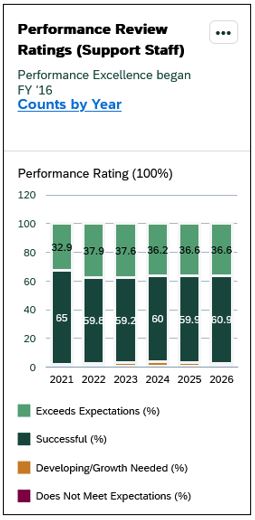
The Performance Review Ratings Card displays the distribution of performance ratings for completed annual reviews for support staff employees.
Only employees with a completed performance review are included in this card.
This card is based on the Performance Excellence process and reflects ratings recorded in the HR/Payroll system.
Performance Excellence was launched in FY16. Data prior to FY16 reflects department-led review processes and may not be complete or directly comparable to later years.
Click the “Counts by Year” link to view the number of employees within each rating category.
Key Metrics & Definitions
Percentages represent the distribution of performance ratings for completed reviews for benefit-eligible support staff employees.
Performance ratings reflect the final evaluation outcome recorded in the HR/Payroll system.
The following rating categories are included:
- Exceeds Expectations
- Successful
- Developing/Growth Needed
- Does Not Meet Expectations
For detailed descriptions of each rating category, refer to the Performance Excellence help pages.
Security & Access
The Generation card is available to users with the following roles:
- Report Administrator Sensitive
Org-based security applies; users will only see data for organizations they are permissioned to access.
Drilldown Page
Select any data point within the card to open the drilldown page for that fiscal year. To view a different fiscal year, adjust the Fiscal Year filter at the top of the page.
> Filters
The following filters can be applied on the drilldown page. Click 'Go' to apply your selections.
|
Visible by Default |
Available through 'Adapt Filters' |
*Required filter |
|
> Default Views
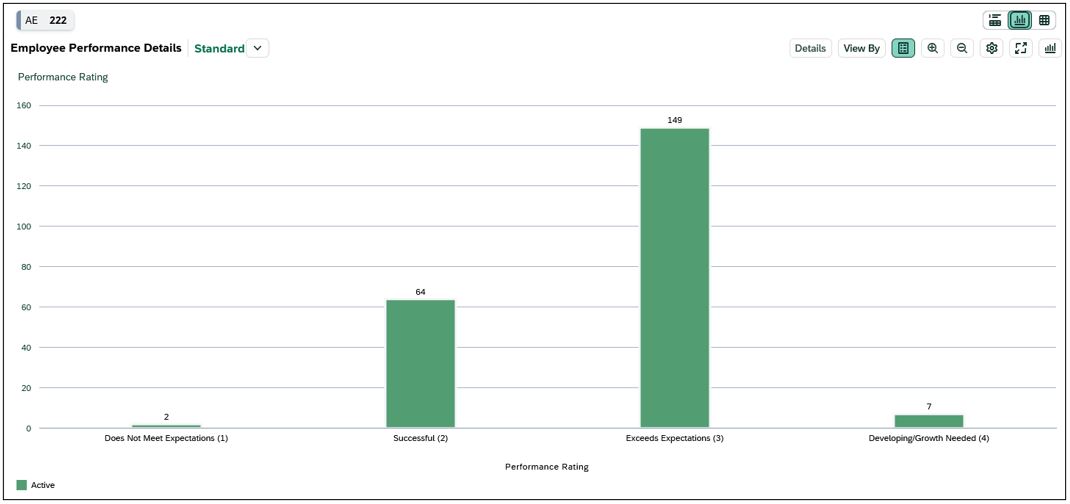
- Chart View: Displays employees by Rating in a column chart.
-
Table View: Displays the following fields by default:
- Employee Name
- Personnel Subarea
- Employee Group
- Employee Subgroup
- Organizational Unit
- Job
- Performance Status
- Performance Rating
> Customizing Your View
You can personalize the chart and table to better align with your analysis needs. Click the gear icon to add, remove, or reorder dimensions. For a brief walkthrough, see the Customizing & Saving Views video .

Available dimensions include:
|
|
|
Note: Employees with a performance status of 'Cancelled' or 'Not completed' will have a performance rating of 'Cancelled/Not Completed'.
Interpreting the Data
This card includes employees with a completed performance review. Employees with reviews that were cancelled or not completed are excluded from this view. For information on evaluation completion and timeliness, including late and not completed evaluations, see the Performance Review Completion & Timeliness card.
Performance ratings are based on the final evaluation recorded in the HR/Payroll system and are aligned to the fiscal year based on the task due date, not the date the evalutaion was completed. If an evaluation is completed in a later fiscal year, the rating is still reported in the fiscal year of the task due date.
Please review the Interpreting the Data section on the main dashboard help page. It highlights key considerations—such as effective dates and organizational changes—that may influence results.