HCM Analytics
Race & Ethnicity
Overview
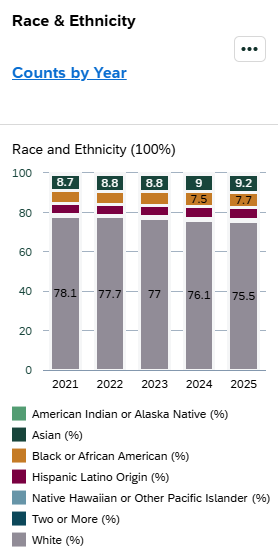
The Race & Ethnicity card displays the percentage distribution of benefit-eligible employees by race and ethnicity as of July 1 of the selected fiscal year. This card provides insight into workforce diversity across the organization.
Click the “Counts by Year” link to view the number of employees in each race and ethnicity category in a table format.
Key Metrics & Definitions
Percentages represent the distribution of benefit-eligible employees by race and ethnicity as of July 1.
Race and ethnicity values reflect the information stored in the HR/Payroll system based on employee self-identification. Employees who indicate Hispanic/Latino Origin are counted within that category regardless of race. When Hispanic/Latino Origin is selected, the employee’s race is not counted separately in the race categories shown in this card.
For detailed descriptions of each category, see: Race & Ethnicity Category Definitions
Security & Access
The Race & Ethnicity card is available to users with the following roles:
- Report Administrator Sensitive
Org-based security applies; users will only see data for organizations they are permissioned to access.
Drilldown Page
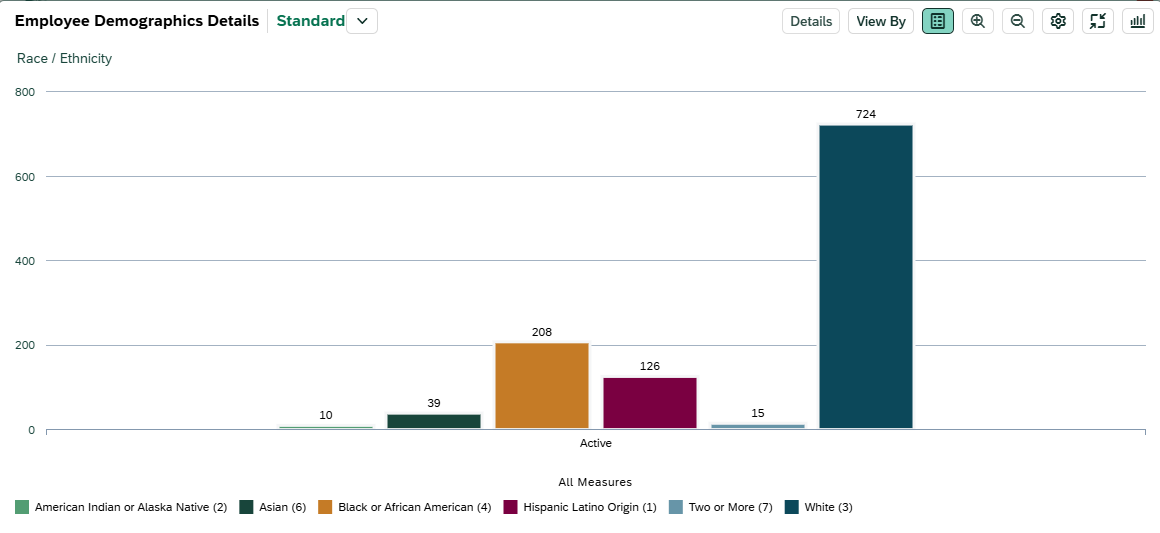
Select any data point within the card to open the drilldown page for that fiscal year. To view a different fiscal year, adjust the Fiscal Year filter at the top of the page.
> Filters
The following filters can be applied on the drilldown page. Click 'Go' to apply your selections.
|
Visible by Default |
Available through 'Adapt Filters' |
*Required filter |
|
> Default Views
-
- Chart View: Displays employees by Race & Ethnicity categories in a column chart.
-
-
Table View: Displays the following fields by default:
- Employee Name
- Personnel Subarea
- Employee Group
- Employee Subgroup
- Organizational Unit
- Job
- Race/Ethnicity
- Gender
- Work Contract
-
Table View: Displays the following fields by default:
> Customizing Your View
You can personalize the chart and table to better align with your analysis needs. Click the gear icon to add, remove, or reorder dimensions. For a brief walkthrough, see the Customizing & Saving Views video .

Available dimensions include:
|
|
|
Interpreting the Data
Race and ethnicity values reflect the information stored in the HR/Payroll system based on employee self-identification. Employees who indicate Hispanic/Latino Origin are reported within that category regardless of race and are not counted separately within race categories in this visualization.
This approach aligns with federal reporting standards (such as IPEDS and EEO reporting), which treat Hispanic/Latino as an ethnicity reported separately from race.
Please review the Interpreting the Data section on the main dashboard help page. It highlights key considerations—such as effective dates and organizational changes—that may influence results.